A note-first sequencer for composing and arranging.
Raito is building RC to create his ideal composing environment. It focuses on writing notes and editing audio for composition and arrangement, with final mixing and mastering handled in a DAW.
RC is a note-first sequencer: a tool built around entering notes and arranging music. It focuses on those tasks rather than covering every function of a DAW (digital audio workstation).
RC
Compose and arrange in RC
Write melodies and accompaniment, choose sounds, and edit audio material.
→Transfer as MIDI or WAV
DAW
Mix and master in your DAW
Make detailed level and balance adjustments and finish the track.
Export your notes or rendered audio, then continue in the DAW you already use.
FEATURES
Tools for writing and arranging music.
Enter notes, build the parts around them, and add audio material where you need it. These screenshots show how composing works in RC.
01 / PIANO ROLL
Note input and editing come first
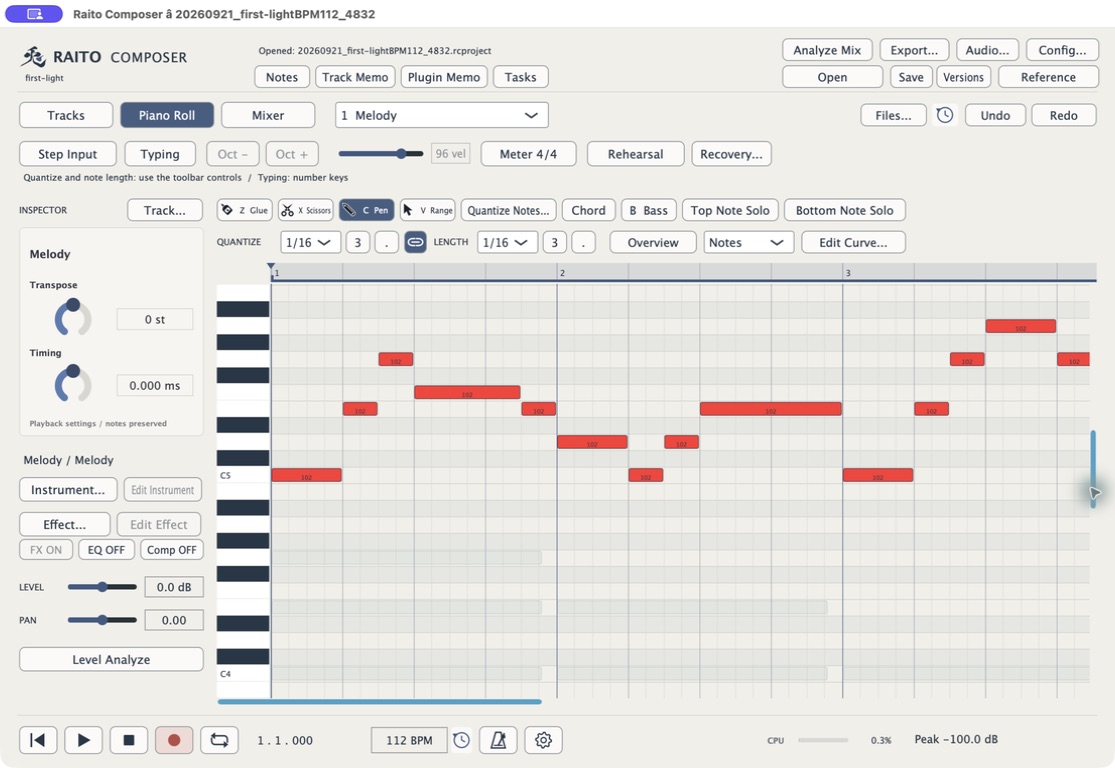
The piano roll displays notes as rectangles. Their vertical position sets the pitch, and their length sets the duration. Listen as you edit melodies and accompaniment.
↕Vertical position sets the pitch.
↔Time runs from left to right.
The rectangle’s length sets the note’s duration.
Enter notes with your mouse, a MIDI keyboard, or your computer keyboard. You can follow the notes without reading sheet music.
Enlarge screenshot ↗PIANO ROLLChange each note’s position and length to edit the melody.
02 / TRACKS
Arrange parts on separate tracks
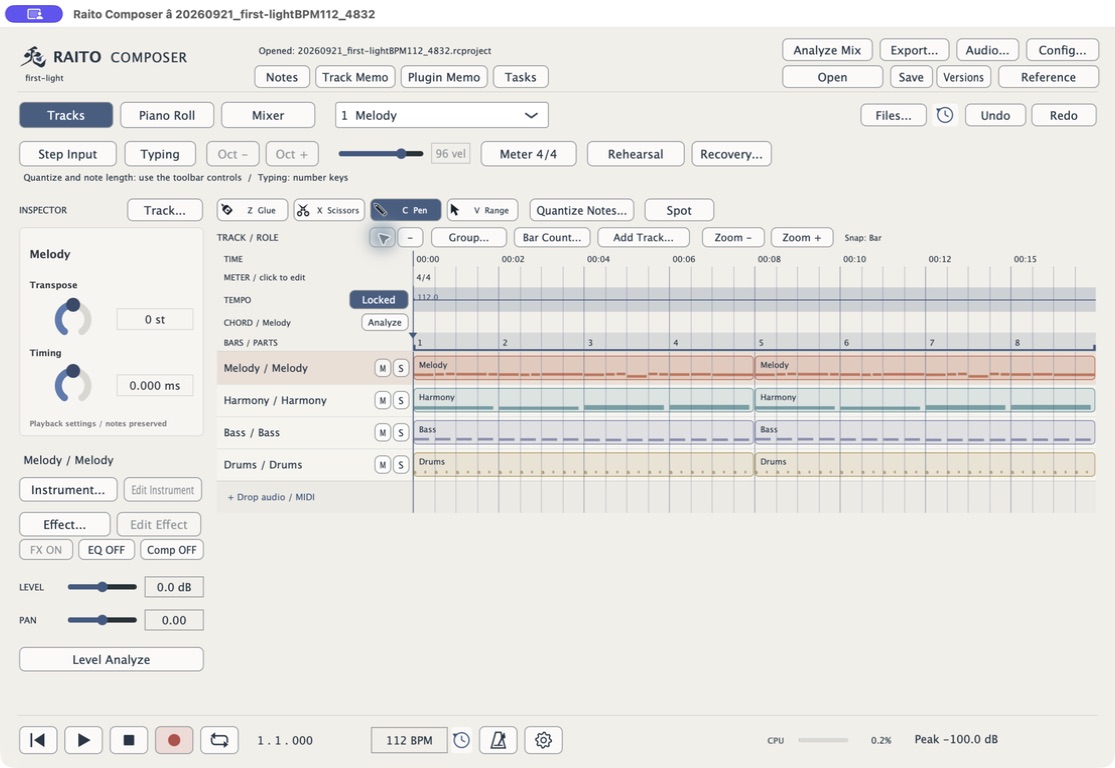
A track holds notes and phrases for an instrument. Put melody, harmony, bass and drums on separate tracks. Move or copy phrases to change the arrangement.
MelodyHarmonyBassDrums
Repeating phrases and making small adjustments are part of composing. Use Undo whenever you want to reverse an edit.
Split and position audio clips and adjust their fades. Edit rhythm loops or phrases and use them in your song. RC includes waveform editing for this kind of remix-based approach to composition.
Source audio
↓
Split and arrange
AUDIO CLIPSIllustration of splitting and rearranging audio material.
INSTRUMENTS
Included instruments and VST3
Play your notes using the included instruments, or load VST3 instruments and effects installed on your Mac. Instrument plug-ins generate sound. Effect plug-ins process it.
INSTRUMENTVST3INSTRUMENT PLUG-IN
External plug-ins require a separate installation. Compatibility testing is ongoing.
FILE EXPORT
Move your arrangement to your DAW
Export notes as MIDI files and rendered audio as WAV files. Use your familiar DAW for final mixing and mastering.
RC
MIDIWAV
OTHER DAW
MIDI
Performance data, including note pitch and duration.
WAV
An audio file containing the rendered sound.
WHY RAITO COMPOSER
Building the tool I want to compose with.
A note from Raito
Developer: Raito
Composer of music for MELTY BLOOD, UNDER NIGHT IN-BIRTH, and other games.
I’m building Raito Composer to become the ultimate composing environment for me.
Today’s DAWs are very capable. To me, much of their progress has been focused on audio. I still found things I wanted to improve in the way notes are entered and edited.
Make composing on a laptop more comfortable
CPUs and storage have improved enormously, but a laptop’s screen size and input devices still limit how I work. I started RC to build a note-entry environment I could be satisfied with.
Keep improving the small operations
From small frustrations with copy and paste to adding expression to individual notes, I want to reduce the work involved in composing. Automating parts of that expression editing is also an area for future development. The aim is to turn the music I have in mind into a finished arrangement with as few steps as possible.
FREE RELEASE
Built for my own work. Planned as a free release.
As development continued, I began to think RC might be useful to other people too. That is why I decided to release it for free.
RC has some very specific design choices because it is built around the way I compose. But if you’re curious about making music, you’re welcome to try it when it is released, even as a beginner.
I believe its capabilities can serve beginners as well as professionals. I’ll keep improving how it works through regular updates after release.
A WORK IN PROGRESS
Development and system support
RC is currently being developed for release on Apple Silicon Mac. The release date has not been set.
Platform
macOS Apple Silicon
Release
In development Date to be announced
Price
Planned as a free release
Download information will appear here when distribution begins. A Windows version is planned for the future.

 Enlarge screenshot